Maggie Just Got Smarter: Meet the New Unified AI Experience for Nonprofits
- May 30
- 6 min read
Updated: 7 hours ago
Published: May 31, 2026 · By May Piamenta
At Vee, we have always believed nonprofits do not need more tools. They need real support. Real capacity. Real teammates. That is why we are excited to introduce one of the biggest updates we have made to Maggie yet: a new consolidated AI experience designed to feel less like software, and more like an actual member of your team.
What Is Maggie?
Maggie is Vee's AI social media assistant built specifically for nonprofits. She handles the full social media workflow — planning, content creation, caption writing, visual generation, scheduling, approvals, and performance insights — so nonprofit teams can stay visible and consistent on Facebook, Instagram, and LinkedIn without spending hours on content every week.
Unlike general-purpose social media tools, Maggie is built around nonprofit workflows. She understands the difference between a donor thank-you post and a volunteer recruitment campaign. She learns your organization's tone, visual style, and posting preferences over time. And she works in a human-in-the-loop model by default — posts are reviewed and approved by your team before anything goes live.
Key facts about Maggie:
Item | Detail |
Product | Maggie by Vee |
Category | AI social media assistant for nonprofits |
Audience | Nonprofit teams, communications teams, fundraisers, executive directors |
Core jobs | Planning, captions, visuals, approvals, scheduling, performance insights |
Supported platforms | Facebook, Instagram, LinkedIn |
Latest update | Unified AI experience with organization memory and smoother approval workflows |
Human control | Posts are reviewed and approved before publishing by default |
What Changed?
Previously, different actions inside Maggie were handled by separate agents behind the scenes. Now, planning, editing, scheduling, approvals, and post management are all handled through one unified Maggie experience. The result: faster workflows, better conversations, fewer repetitive steps, and a much more natural interaction overall.
Before and after the update:
Before | Now |
Separate behind-the-scenes agents handled different actions | One unified Maggie experience handles planning, editing, scheduling, approvals, and post management |
Repeated instructions every session | Organization memory carries preferences forward automatically |
More confirmation steps before small actions | Simplified approve/reject workflows reduce back-and-forth |
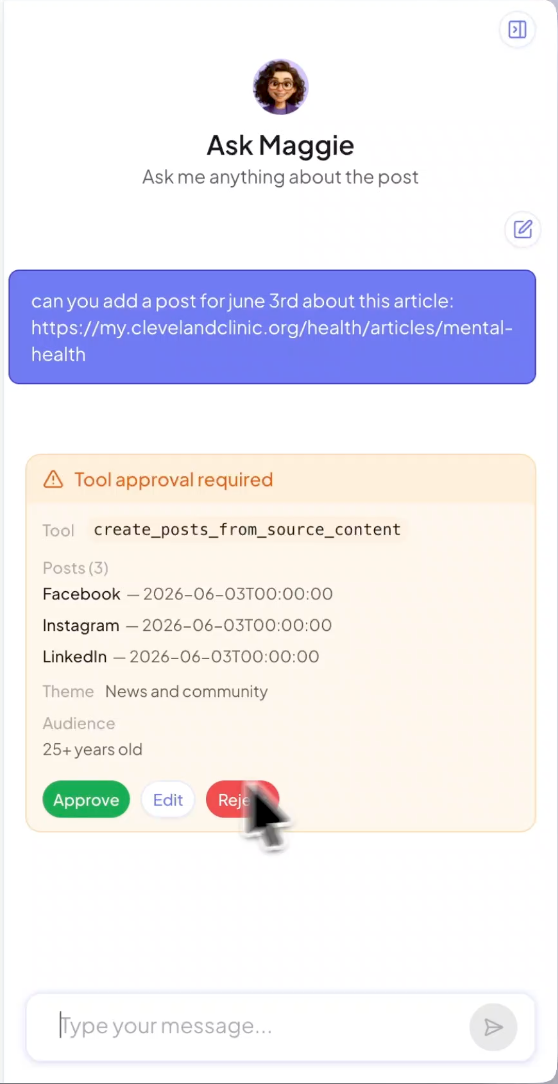
More manual interface actions | Maggie can interact with cards, calendars, and editing actions directly |
Separate creative requests for captions and visuals | Captions, visuals, and image edits happen in one connected workflow |
What Is New Inside Maggie
Organization Memory
Maggie now remembers organization-specific preferences over time. Things like preferred posting times, logo placement, visual style requests, tone preferences, and recurring formatting instructions can now carry across future interactions automatically. Instead of repeating yourself every time, Maggie learns how your organization works.
Higher Quality Conversations
This new version is powered by an upgraded reasoning model designed to improve response quality, reduce hallucinations, better understand nonprofit context, and make interactions feel more collaborative and strategic. The goal is not just automation — it is smarter support.
Interactive Editing and Front-End Actions
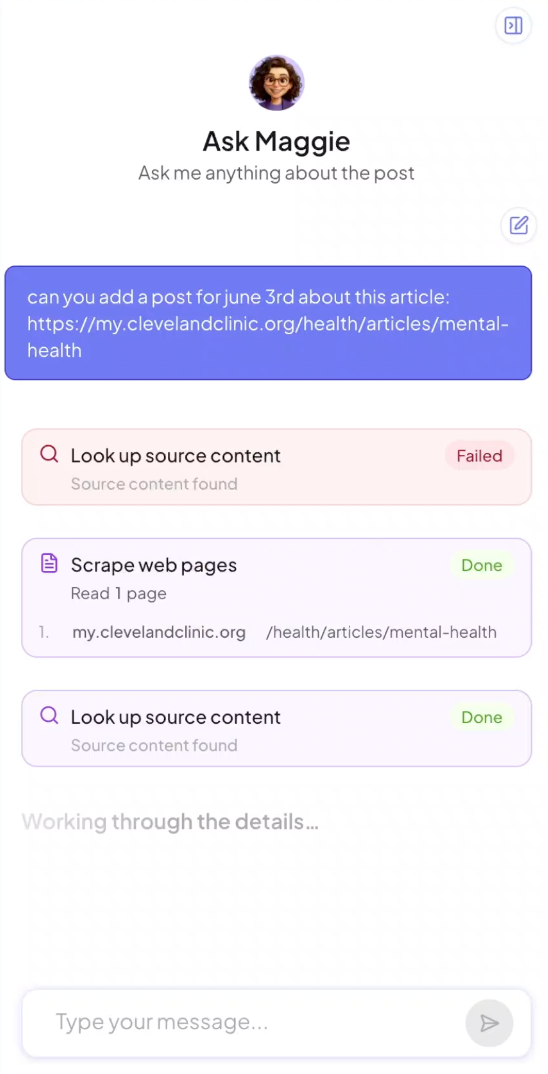
Maggie can now directly interact with parts of the platform interface — refreshing the calendar automatically after edits, updating content dynamically, and using interactive cards and actions inside conversations. This creates a much smoother editing and scheduling experience.

Faster Approval Workflows
One of the biggest friction points in content workflows is unnecessary back-and-forth. Now, instead of repeatedly asking for confirmation before every small action, Maggie uses a simplified approval and rejection workflow for things like deleting posts, creating new drafts, and approving edits. Fewer interruptions. More momentum.
Background Generation for Captions and Images
Generating captions and visuals now happens through background jobs, making the experience cleaner and more scalable.
Improved Image Editing
You can now request portrait or square formats, visual adjustments, reference-based edits, and image substitutions through copy and paste. This gives nonprofits more creative flexibility without needing external design tools for every change.
Why We Built It This Way
When we look at what actually slows nonprofit communications teams down, it is rarely a lack of ideas. It is the friction between having an idea and getting it published — the back-and-forth, the repeated instructions, the switching between tools to handle strategy, content, visuals, and scheduling separately.
The biggest challenge we saw was not that nonprofits needed more AI features. It was that they needed one smoother workflow where all of it — strategy, content, visuals, approvals, and scheduling — could happen together without starting from scratch every session. That is what this update is built around.
— Stephanie Weisinger, Vee
How Nonprofit Teams Can Use Maggie's Unified AI Experience
The unified experience is not just a technical upgrade. It opens up a different way of working for lean nonprofit communications teams. Here is what that looks like in practice:
Monthly social media calendar planning. Ask Maggie to plan a full month of content across Facebook, Instagram, and LinkedIn — aligned to your programs, campaigns, and upcoming events. With organization memory, Maggie already knows your tone, posting cadence, and visual style going in.
Fundraising campaign posts. Generate a full series of fundraising posts — urgency posts, impact stories, donor spotlights, countdown posts, and thank-you content — in one workflow rather than building each post separately.
Donor thank-you posts. Turn a donation milestone or campaign result into a public thank-you post that reflects your organization's voice and acknowledges your community's support.
Volunteer recruitment campaigns. Create a multi-week recruitment campaign with varied messaging — what the role involves, who you are looking for, why volunteers choose your organization — without writing every post from scratch.
Event promotion. Build a full event promotion sequence from announcement through day-of reminder and post-event recap, with visuals and captions adapted for each platform.
Awareness month content. Plan and schedule a full awareness month calendar — with platform-specific captions, visuals, and hashtags — in one planning session rather than week by week.
Sponsor visibility posts. Create sponsor acknowledgment and partnership posts that match your visual brand while giving appropriate visibility to funders and corporate partners.
Repurposing newsletters into social posts. Paste a newsletter or program update into Maggie and get platform-ready posts for LinkedIn, Instagram, and Facebook — each adapted to the format and tone of that platform.
Turning program updates into social content. Share a program milestone, outcome data, or participant story and let Maggie turn it into ready-to-approve content across all three platforms at once.
Why This Matters in Practice
Nonprofit teams are already stretched thin. The goal with Maggie has never been to simply generate posts. It is to reduce operational friction so teams can stay visible, consistent, and focused on their mission.
The results from nonprofits already using Maggie reflect what that looks like at scale:
Up to 300% reach growth
4x content volume without adding staff
72% reduction in time spent on content creation
Myra's Kids Foundation: 669,000+ views and 21,000+ website visits in 12 months
BRCA Strong: 94.9% reach growth and 11,300+ reach per post
See the full nonprofit AI results and case studies from teams using Maggie today.
This update brings Maggie one step closer to feeling like a true AI teammate built specifically for nonprofits — not a tool you manage, but a colleague who already knows how your organization works.
Frequently Asked Questions
What is Maggie's unified AI experience?
Maggie's unified AI experience means that planning, content creation, scheduling, approvals, and post management now happen through a single connected workflow — instead of separate agents handling each action independently. The result is fewer repeated steps, smoother editing, and a more natural interaction that feels less like using software and more like working with a teammate.
How does Maggie's organization memory work?
Maggie now retains organization-specific preferences across sessions — including posting times, logo placement, visual style, tone, and formatting instructions. Instead of re-explaining your preferences every time you start a new workflow, Maggie carries that context forward automatically.
Can Maggie publish posts without approval?
No. Maggie works in a human-in-the-loop model by default. Posts are reviewed and approved by your team before anything is published. The new update simplifies the approval workflow to reduce back-and-forth, but human review remains part of every publishing decision.
Which social media platforms does Maggie support?
Maggie currently supports Facebook, Instagram, and LinkedIn.
How does Maggie help nonprofit teams save time?
Nonprofits using Maggie report up to 72% reduction in time spent on content creation and 4x content volume without adding staff. Maggie handles the repetitive parts of the social media workflow — drafting, formatting, scheduling, and tracking — so your team can focus on mission-critical work. See the full nonprofit AI results.
Can Maggie create both captions and visuals?
Yes. Maggie handles both caption writing and visual generation in one workflow. The latest update also adds improved image editing capabilities — including portrait and square formats, reference-based edits, and image substitutions — so you have more creative flexibility without needing external design tools.
How is Maggie different from using ChatGPT or Canva?
ChatGPT has no memory of your organization, no social media calendar, no scheduling, and no approval workflow. Canva handles design but not strategy, captions, or publishing. Maggie combines all of it — planning, captions, visuals, approvals, and scheduling — in one nonprofit-specific workflow that learns your organization over time and keeps your team in control of every post.
Can Maggie help with fundraising campaigns and awareness campaigns?
Yes. Maggie is designed to handle full campaign workflows — from planning a multi-week fundraising series to scheduling an entire awareness month calendar across platforms. With organization memory, Maggie already knows your tone and visual preferences going in, so campaign content is on-brand from the first draft.
Does Maggie learn a nonprofit's brand voice over time?
Yes. Organization memory means Maggie retains tone preferences, formatting instructions, visual style, and other organization-specific details across sessions. The more you work with Maggie, the less time you spend re-explaining how your organization communicates.


Comments